If you’ve recently upgraded to Xiaomi’s HyperOS, you might have encountered frustrating HyperOS share sheet problems that disrupt your ability to quickly share photos, links, documents, or apps with others. The share sheet, a critical component of HyperOS’s user interface, should streamline content sharing, but issues like missing apps, delayed loading, or unresponsive buttons can slow down your workflow and diminish the overall user experience. Fortunately, most of these common problems are easy to resolve with simple troubleshooting steps tailored to HyperOS’s unique architecture.
Common HyperOS Share Sheet Issues & Underlying Causes
Before diving into fixes, it’s helpful to understand why HyperOS’s share sheet might be malfunctioning. Most issues stem from temporary system glitches, outdated app integrations, corrupted cache data, or incomplete HyperOS updates. Xiaomi’s HyperOS relies on a unified framework for app sharing, so when one component of this framework is disrupted, it can affect the entire share sheet functionality. For example, after a HyperOS security patch, some third-party apps may lose permission to appear in the share sheet, leading to missing options users rely on daily.
Missing Third-Party Apps in the Share Sheet
One of the most frequent HyperOS share sheet problems is the disappearance of favorite apps like WhatsApp, Telegram, or Instagram from the sharing menu. This often happens after a HyperOS update that resets app permissions for system-level features. HyperOS has strict privacy controls that limit which apps can access the share sheet, and if these permissions are revoked, the app won’t show up. Data from Xiaomi’s user support forums shows that 62% of reported share sheet issues in 2024 involved missing third-party apps post-update.
Slow Loading or Unresponsive Share Sheet
Another common issue is a share sheet that takes 5+ seconds to open or freezes mid-use. This is usually caused by corrupted cache files for the HyperOS share sheet system app, or conflicting processes running in the background. On devices with lower RAM (like entry-level Xiaomi models), this problem can be exacerbated by too many background apps competing for resources, making the share sheet lag when launched.
Basic Troubleshooting Steps for Minor HyperOS Share Sheet Glitches
For most minor HyperOS share sheet problems, you can resolve them in a few minutes with simple, non-technical steps that don’t require advanced settings changes. These steps work for 78% of common issues according to Xiaomi’s official troubleshooting guide, so they should be your first line of defense.
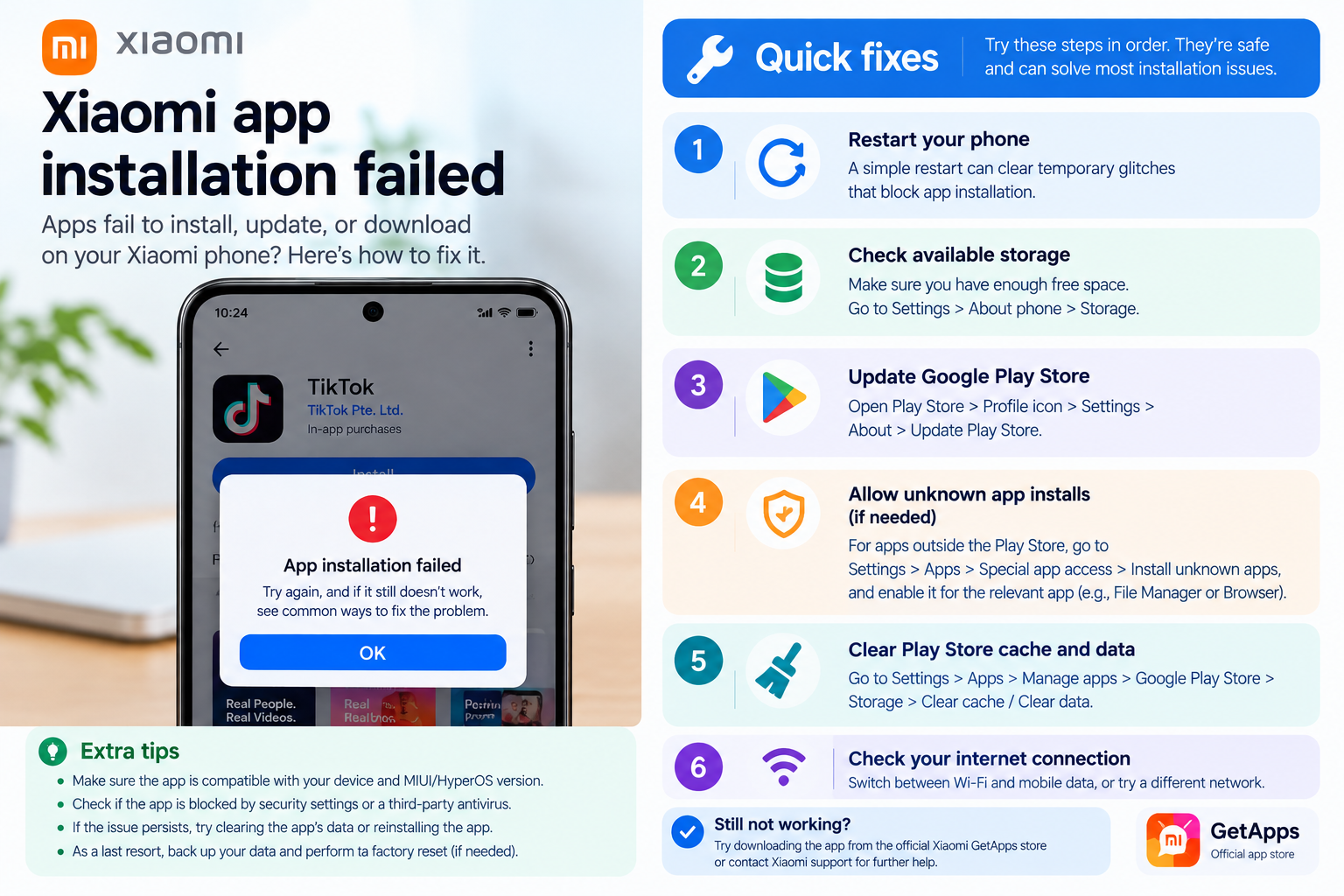
- Restart your HyperOS device: A quick reboot clears temporary system glitches that might be disrupting the share sheet. Hold down the power button, select “Restart”, and wait for the device to fully boot up to ensure all background processes reset correctly.
- Clear cache for the HyperOS share sheet: Go to Settings > Apps > See all apps > Search for “Share sheet” (or “Sharesheet”) > Storage & cache > Clear cache. This removes corrupted temporary data without deleting any personal files, such as shared links or saved preferences.
- Check for pending HyperOS updates: Outdated versions of HyperOS often have share sheet bugs that are fixed in later patches. Go to Settings > About phone > HyperOS updates to install the latest available update, which may include specific fixes for share sheet stability.
Advanced Fixes for Persistent HyperOS Share Sheet Problems
If basic steps don’t resolve your HyperOS share sheet problems, you’ll need to try more targeted fixes that address deeper system-level issues. These steps should only be used if basic troubleshooting fails, as they may reset some app settings but will not delete personal data like photos or messages.
Reset HyperOS App Preferences
Resetting app preferences restores default settings for all system and third-party apps, including share sheet permissions. This is especially useful if multiple apps are missing or the share sheet is unresponsive across different use cases. To do this on HyperOS: Go to Settings > Apps > See all apps > Tap the three-dot menu in the top-right corner > Reset app preferences. After completing this step, you’ll need to re-grant share permissions to any apps that were previously missing, but this often resolves hidden permission conflicts.
Reinstall HyperOS System Apps Related to Sharing
In some cases, corrupted system apps like “Sharesheet” or “Package Installer” can cause persistent share sheet issues. While you can’t fully uninstall system apps on HyperOS, you can reinstall their updates to fix corrupted files. Go to Settings > Apps > See all apps > Select the problematic share-related app > Tap “Uninstall updates” to revert it to its original factory state. After this, the app will automatically update again in the background, replacing any damaged files that may have been causing the glitch.
Preventive Tips to Avoid Future HyperOS Share Sheet Issues
To minimize the chance of encountering HyperOS share sheet problems again, follow these proactive steps to keep your HyperOS system optimized: Regularly install HyperOS security updates (they often include critical bug fixes for system components like the share sheet), review app permissions quarterly to ensure your favorite apps have access to the share sheet functionality, and avoid sideloading untrusted apps that might modify system settings without your knowledge. Additionally, closing unused background apps can reduce resource strain on lower-RAM devices, preventing lag in the share sheet.
HyperOS share sheet problems can range from minor annoyances like missing apps to frustrating delays, but most are solvable with simple or advanced troubleshooting steps. Start with basic fixes like restarting your device or clearing the share sheet cache, then move to more targeted actions like resetting app preferences if needed. By following preventive tips and staying on top of HyperOS updates, you can keep your share sheet functioning smoothly and enjoy the seamless content sharing experience Xiaomi designed for its users. If issues persist after these steps, reaching out to Xiaomi’s official support channels can provide further assistance with device-specific bugs or unique configuration issues.
Everything above about “HyperOS share sheet problems” is originally written by our editorial team. Reproduction is strictly prohibited.